
FaithPath
SAILIBERTY TECHBooks & Reference
4.9128.00 Reviews
- Version
- 1.1.9
- Installs
- 50.00K
- Age Rating
- Everyone
Screenshots

Our Review of FaithPath
 Analysis by Appyee
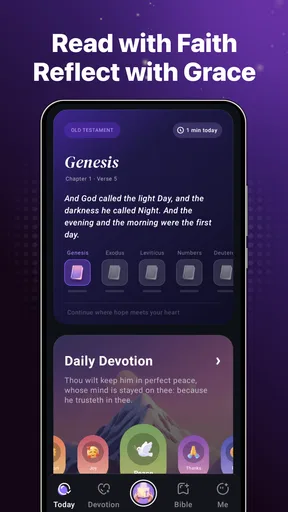
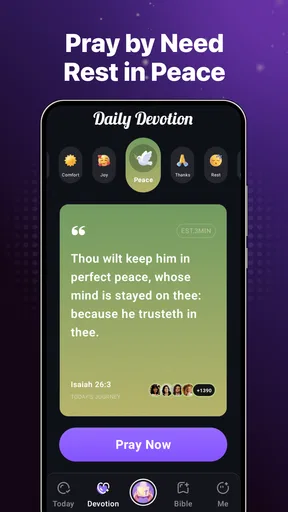
I approached FaithPath as a quiet reading companion rather than a general-purpose book app. Its focus is simple: helping people read, reflect, and grow in faith through a mobile experience. That narrow purpose is its main appeal. Instead of asking you to manage a large personal library or search through unrelated subjects, it points your attention toward faith-centered reading and reflection.
After spending time with it, I think it makes the most sense for someone who wants a regular moment of spiritual reading during an ordinary day. It can fit before work, during a commute, after dinner, or as part of a personal routine. At the same time, I would not choose it as a replacement for a full digital Bible, an academic reference tool, or a broad e-book platform. Its value comes from focus, not from trying to cover every possible reading need.
How FaithPath fits into a connected reading routine
FaithPath belongs to the Books & Reference category and is developed by SAILIBERTY TECH. It is free to use, rated for Everyone, and currently listed as version 1.1.4 for devices running Android 8.0 or later. The app has passed the early discovery stage with over 10 thousand installs, while its average score sits at 4.9 from more than 250 ratings and over 80 written reviews. Those figures suggest that its focused approach is connecting with the people who find it.
The first thing I noticed about this kind of app is how much the reading experience depends on the conditions around it. A faith-reading session may begin with a stable connection at home, then continue in a place where the signal is weaker. If the app needs to retrieve material or refresh its content, the difference between a smooth start and a frustrating pause can affect whether the habit continues.
That is why I would open FaithPath before the moment when I actually want to read. At home, I would give the app time to load, then begin the selected passage or reflection while the connection is reliable. This small change in routine matters more than it sounds. It prevents a quiet personal moment from turning into repeated loading attempts, especially when I am already short on time.
The app’s purpose also makes connectivity feel different from what it would in a social or entertainment application. There is no need for constant interaction with other people to make the experience worthwhile. A connection is mainly useful for reaching the reading material and keeping the app current. Once I am settled into a passage, the important part is the attention it creates, not the network itself.
When a connection helps and when it gets in the way
FaithPath is best approached as a connected reading tool. When the network is behaving normally, opening a faith-centered app and moving into a reflective session feels straightforward. The experience benefits from that low-friction transition: I can go from deciding to read to actually reading without first organizing files, importing documents, or searching a large catalog.
The trade-off is that a network interruption can arrive at exactly the wrong time. A weak signal in a basement, a crowded public hotspot, or a mobile connection that has temporarily slowed may make the app feel less dependable than a locally stored book. I would not interpret that as a reason to dismiss FaithPath, but I would plan around it. The app suits a routine where I usually have dependable access better than one built around remote travel or unpredictable reception.
One useful habit is to separate discovery from reading. When connected, browse and decide what you want to spend time with. Then begin the session without constantly switching between sections or reopening the app. This reduces the number of moments in which a connection problem can interrupt your concentration.
That workflow is especially helpful for readers who use short sessions. If I only have a few minutes before an appointment, a delay feels disproportionately large. Preparing the app while connected gives those brief windows a better chance of becoming meaningful instead of being consumed by waiting.
Using it in real mobile situations
The most natural setting for FaithPath is a personal phone routine. I can imagine opening it on a quiet morning, reading before the rest of the household is awake, or using it during a lunch break when I want something more deliberate than scrolling through a social feed. The compact format of a phone makes those moments accessible, but it also exposes the app to the realities of mobile use.
Mobile networks change constantly. A train may move through a poor-signal area, a café may have an overloaded Wi-Fi network, and a phone may switch between connection types while I am reading. For that reason, I would avoid making the app the only thing I rely on for an important group study or scheduled discussion. If a particular passage matters for that meeting, I would arrange access to it ahead of time through a dependable source as well.
FaithPath is more comfortable in a flexible personal routine than in a tightly timed shared event. If I miss a morning session because the connection is slow, I can return later. If several people are waiting for me to open a reading during a discussion, the same delay becomes more disruptive.
Another practical point is screen attention. A reflective app works best when notifications are not competing for the same space. I would put the phone on a quieter setting, open the app with a specific intention, and avoid treating the session as something to squeeze between several unrelated tasks. That is not a special feature of FaithPath, but it is particularly important here because the app’s benefit depends on the quality of attention I bring to it.
For a parent or caregiver, the app could work well in short, repeatable windows. A few minutes after a child goes to sleep or while waiting in a school pickup line may be enough for a reading habit. The connection question remains important, though: I would start the material before moving into an area where the phone may lose service rather than assuming the session will always recover smoothly.
What to do when loading or access fails
Every connected reading experience needs a recovery plan. If FaithPath does not respond immediately, my first step would be to avoid tapping repeatedly. Repeated attempts can make it harder to tell whether the issue is the connection, the app state, or the phone itself. I would wait briefly, check whether other apps can reach the internet, and then try again once the connection is stable.
If other apps are also struggling, the sensible fix is to change networks or move to a place with better reception. If everything else works, I would close and reopen FaithPath, then return to the reading task rather than repeatedly navigating through the same screen. This keeps the recovery process simple and protects the calm mood that the app is meant to support.
I also recommend keeping the app updated through the normal app-management tools on the device. The current version is 1.1.4, and staying current is generally useful when an app depends on changing operating systems or network services. I would not update immediately before an important reading session if I had a choice; I prefer to update at a convenient time, open the app afterward, and make sure the routine still works.
The minimum Android requirement of version 8.0 makes FaithPath available to a wide range of older devices, but compatibility alone does not guarantee an equally smooth experience on every phone. Older hardware, limited memory, aggressive battery management, or unstable connectivity can still affect how quickly a reading app opens and resumes. If the app feels slow, I would first reduce background activity and check the network before deciding that the reading experience itself is unsuitable.
A realistic example would be using FaithPath during a hotel stay. I might connect to the hotel Wi-Fi, open the app, and find that the network requires an extra sign-in step or is temporarily overloaded. Rather than abandoning the session, I would authenticate the network first, give the app a clean restart, and choose a shorter reading window. The point is not to turn reflection into technical troubleshooting, but to have a small fallback routine that prevents one failed connection from breaking the habit entirely.
Keeping mobile data use under control
Because FaithPath is centered on reading rather than media-heavy entertainment, I would expect my main concern to be access reliability rather than constant data consumption. Still, careful users may prefer not to leave any reading app refreshing while mobile data is limited. I would use Wi-Fi for initial setup and for exploring the available material, then reserve mobile data for occasions when I genuinely want to read away from home.
Android’s own data controls can help here. I would check the phone’s app-level mobile-data settings, especially if my plan is restricted or if I often use FaithPath while traveling. I would also avoid leaving the app open in the background for long periods when I am not reading. That is a sensible precaution for any network-connected app and helps keep the phone’s overall behavior easier to understand.
There is a useful trade-off between convenience and certainty. Opening FaithPath whenever inspiration strikes is convenient, but planning a session while connected gives me more confidence that the material will be available when I need it. For someone with generous data and a dependable network, that preparation may feel unnecessary. For someone on a limited plan, it becomes part of using the app responsibly.
I would also be cautious when using public Wi-Fi. A public network may be fast enough for ordinary browsing but inconsistent when an app is trying to retrieve content. If I am reading in a café, I would rather wait for the app to open properly before settling in, instead of assuming that a visible Wi-Fi symbol means the connection is truly usable.
The same advice applies while traveling internationally. FaithPath may be appealing as a small personal reading companion on a trip, but I would not build my entire plan around uninterrupted mobile access. I would test the app before leaving, use trusted Wi-Fi when possible, and keep another legitimate way to reach important reference material. That is not a criticism of the app’s purpose; it is a realistic response to changing networks and roaming conditions.
Who will appreciate the focused design
I would recommend FaithPath to readers who want a dedicated place for faith-centered reading without the distractions of a broad content platform. It is a good match for someone starting a personal habit, returning to reflective reading after a long break, or looking for a gentle alternative to opening a general browser and getting pulled into unrelated content.
It may also suit families because its age rating is Everyone. That rating makes it easier to consider in a household where several people share devices or where a younger reader may encounter the app. I would still guide children according to the family’s own preferences, but the rating removes one obvious barrier for general household use.
The app is less convincing for readers who need scholarly tools, extensive cross-referencing, detailed annotation, or a large collection of unrelated books. A full Bible application may be better for someone who wants multiple translations and advanced study functions. An e-reader may be a stronger choice for a person who already owns a large digital library. FaithPath’s advantage is the intentional setting, not depth across every reading format.
I would also skip it if my main goal were entertainment reading. Someone looking for novels, magazines, or a broad selection of reference titles will likely find a general bookstore or library app more appropriate. FaithPath asks for a particular kind of attention, and that specialization is valuable only when it matches what I actually want to read.
How it compares with familiar alternatives
Compared with a general browser search, FaithPath offers a more contained starting point. A browser can find almost anything, but that abundance creates friction: I have to choose a source, deal with unrelated results, and resist distractions. FaithPath is more useful when I already know that I want a faith-oriented reading moment and do not want to assemble it from scattered pages.
Compared with a dedicated Bible app, the decision depends on purpose. A Bible app is usually the stronger choice for intensive study, verse lookup, multiple versions, or detailed navigation. FaithPath is more appealing when I want a simpler reflective routine rather than a research session. I would keep both types of app if my needs covered both situations, instead of forcing one tool to do the other’s job.
Compared with a paper devotional or printed book, the phone is more convenient to carry and easier to open during an unexpected spare moment. The downside is that the phone also carries notifications, messages, and other temptations. A printed book wins when I want a completely separate reading environment. FaithPath wins when portability and immediate access matter more.
Compared with a full e-book platform, FaithPath feels more purposeful but less universal. An e-book service may provide stronger library management and a wider range of authors, while this app is better suited to a reader who wants the subject itself to guide the session. The right choice depends on whether I value breadth or a focused spiritual routine.
My practical verdict on connectivity
FaithPath works best when I treat it as a connected companion that benefits from a little preparation. I would open it on a reliable network, choose the reading I want, and avoid assuming that every mobile location will offer the same smooth access. That approach makes the app feel calmer and more dependable without pretending that network conditions are always perfect.
Its strongest quality is the way a focused faith-reading purpose can reduce the decision-making that often prevents people from reading at all. Its main limitation is equally clear: a connected mobile routine can be interrupted by weak reception, overloaded Wi-Fi, or an unexpected failure at launch. Readers who need guaranteed access in remote locations should choose a source designed around dependable local availability instead.
For my own use, I would keep FaithPath as a lightweight option for regular reflection, especially at home or in familiar places with stable service. I would not make it my only reference tool, and I would prepare before important group sessions or travel. With those boundaries in mind, the free app from SAILIBERTY TECH is easy to recommend to anyone who wants a simple, faith-centered reading habit on an Android device.
My bottom line: FaithPath is most worthwhile when you want focused spiritual reading, not an all-purpose digital library. Its connected nature deserves practical planning, but that small adjustment is reasonable for a free app whose purpose is to help a reader pause, reflect, and return to a meaningful routine.
Privacy and Permissions
See what permissions an app requests and how it handles your data.
- Photos/Media/Files
- read the contents of your USB storage, modify or delete the contents of your USB storage
- Storage
- read the contents of your USB storage, modify or delete the contents of your USB storage
- Wi-Fi connection information
- view Wi-Fi connections
- Other
- view network connections, connect and disconnect from Wi-Fi, full network access, draw over other apps, control vibration, prevent device from sleeping, Google Play license check
Verdict
Strengths of FaithPath
- Clear, faith-centered guidance for building a consistent spiritual routine.
- Simple navigation makes daily reflections easy to find and complete.
- Helpful reminders can encourage regular prayer and devotional habits.
- Suitable for users seeking personal growth through Christian content.
- Short sessions fit well into busy schedules and everyday use.
Limitations of FaithPath
- Content may feel too general for users seeking deeper theological study.
- The app’s appeal depends heavily on personal Christian beliefs.
- Reminder notifications may become repetitive over time.
- Some features or content may require an internet connection.
- Limited customization could disappoint users wanting a more personal experience.
Other Releases by SAILIBERTY TECH
View All
Grace Moments
Books & Reference4.6
Similar Picks in This Category
View All
Google Play Books & Audiobooks
Google LLC4.7

네이버 - NAVER
NAVER Corp.3.5

Wattpad - Read & Write Stories
Wattpad.com3.7

King James Bible - Verse+Audio
Ozion4.8

Bible Offline-KJV Holy Bible
Bíblia Offline4.9

Amazon Kindle: Reading App
Amazon Mobile LLC4.8
You May Also Like
View All
Frequently Asked Questions
What is FaithPath, and what can I use it for?
FaithPath is a faith-focused app designed to support users in developing a more consistent spiritual routine. Depending on the available features, it may provide devotional content, guided reflections, prayer resources, scripture-based materials, or progress tools. It is best viewed as a personal aid for study and reflection rather than a replacement for participation in a local faith community or guidance from a trusted religious leader.
Is FaithPath suitable for beginners in their faith journey?
Yes, FaithPath can be useful for people who are new to faith as well as for users who already have an established spiritual practice. Its guided format may make it easier to begin reading, praying, or reflecting regularly without needing to plan everything independently. However, the experience can vary depending on the content included in the current version, so beginners should explore the app’s categories and settings to find material that matches their beliefs and level of familiarity.
Does FaithPath require an internet connection or an account?
Some FaithPath features may require an internet connection, particularly when loading new lessons, audio, videos, community content, or synchronizing progress. An account may also be needed if the app offers saved preferences, reminders, subscriptions, or cross-device access. Before downloading, check the store listing and the app’s privacy information for the latest requirements. If offline access is supported, confirm which resources can actually be downloaded for later use.
Is FaithPath free to download, and are there in-app purchases?
FaithPath may be available as a free download, but certain content or advanced tools could require in-app purchases, a subscription, or a premium upgrade. Users should review the pricing details shown on the Google Play Store or Apple App Store before starting a trial. Pay close attention to renewal terms, billing frequency, and cancellation instructions, especially if premium access unlocks devotional plans, exclusive materials, or additional personalization features.
What privacy information should I consider before using FaithPath?
Before creating an account or entering personal information, review FaithPath’s privacy policy and the data-safety details provided in the relevant app store. Faith-related interests, journal entries, prayer requests, usage activity, and account details can be sensitive. Avoid sharing information you would not want stored or processed, and check whether the app allows you to delete your account, remove saved content, control notifications, or manage data-sharing permissions through its settings.
